
Unlock Galaxy S25 from Claro in Brasil
Professional unlocking for Samsung Galaxy S25 locked to Claro in Brasil. Fast, safe, permanent unlock solution.
Unlock Your Galaxy S25
Enter IMEI to get started
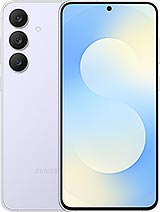
You have secured one of the most powerful Android devices available in South America. The Samsung Galaxy S25, with its cutting-edge Snapdragon 8 Elite processor and Galaxy AI integration, is a technological marvel. However, if you purchased your device through a Claro Brazil promotion or a "Planos Pós" contract, you are likely realizing that your premium hardware is tethered to a single network. If you try to insert a Vivo or TIM SIM card and see the prompt "SIM Network Unlock PIN", you have hit the carrier wall.
Whether you are an expat living in São Paulo, a tourist who bought a phone during Carnival, or a Brazilian looking to use a local SIM while vacationing in the US, you do not need to be restricted. Enter your device details in the form above to retrieve your manufacturer unlock codes immediately.
The "Fidelidade" Myth vs. Your Legal Rights (ANATEL)
Before we explain the solution, we must address a massive misconception specific to the Brazilian market. Many Claro salespeople will tell you that you cannot unlock your phone because you are under a 12-month "Fidelidade" (Loyalty) contract.
This is false. Brazil has some of the strongest consumer protection laws in the world regarding telecommunications, regulated by ANATEL.
- The Law: Under ANATEL Resolution 632, you have the right to unlock your device at any time, regardless of your contract status.
- The Contract: Your loyalty fine refers to the service plan (the monthly bill), not the hardware lock. You can legally unlock the phone to use a second SIM card while continuing to pay your Claro bill.
Samsung's "Double Lock" Problem in Brazil
Unlocking a Samsung S25 from Brazil is slightly more complex than unlocking an iPhone because Samsung applies two layers of restrictions to devices sold in Latin America. It is vital to understand both:
1. The Carrier Lock (Simlock)
This is the standard lock applied by Claro. It prevents the modem from connecting to competitors like TIM, Vivo, or international networks like AT&T. This requires a specific NCK Code to remove.
2. The "Region Lock" (LatAm Restriction)
Samsung locks devices to the continent of sale to prevent grey market exporting. Even if you unlock the Claro carrier restriction, your phone might not work in Europe or Asia immediately.
The Fix: You must make a continuous voice call lasting 5 to 10 minutes using a Brazilian SIM card on a Brazilian tower before leaving the country. This lifts the Region Lock automatically.
The Solution: Manufacturer Codes (NCK & MCK)
Unlike iPhones which are unlocked via a server update, Samsung phones generally require you to type in a specific code. If you cannot visit a physical Claro store with your original invoice (Nota Fiscal) and CPF, using a third-party service is the fastest solution.
Here is why unlocking is the smart move for S25 owners:
| Feature | Claro Brazil Status (Locked) | Our Solution (Unlocked) |
|---|---|---|
| Network Compatibility | Claro BR Only | Vivo, TIM, & Global Carriers |
| Travel Options | Expensive "Passaporte" Roaming | Cheap Local SIMs / Airalo |
| Resale Value | Lower (Restricted to Claro users) | Highest (Universal "Desbloqueado") |
| Dual SIM Use | Both slots locked to Claro | Mix Carriers (e.g., Claro + Vivo) |
Why Unlocking Your S25 Increases Resale Value
In the Brazilian second-hand market (OLX, Mercado Livre), there is a significant price gap between locked and unlocked devices. Buyers are often afraid to buy carrier-locked phones because they associate them with "Non-Payment Blocks." By unlocking your Galaxy S25 legally via code, you convert it into a "Factory Unlocked" unit, which sells faster and for a higher price.
Step-by-Step Guide: How to Unlock Galaxy S25
The process for Samsung devices involves entering a code. It is simple, but precision is key.
Step 1: Get Your IMEI
We need your device's unique identity.
Action: Open the phone app and dial *#06#. You will see IMEI 1 and IMEI 2. You usually only need to submit IMEI 1.
Step 2: Submit Your Request
Use the form at the top of this page. Select "Samsung Brazil" and "Claro." Paste your IMEI. This retrieves your specific codes from the manufacturer database.
Step 3: Enter the Code (The Sequence)
Once you receive our email with your codes (NCK and MCK), follow these steps:
- Turn off your Galaxy S25.
- Insert a SIM card from a different carrier (e.g., Vivo, TIM, or a foreign SIM).
- Turn the phone on.
- The screen will display "SIM Network Unlock PIN."
- Enter the NCK Code provided in our email.
- Press "Unlock."
- Success! The phone will say "Network Unlock Successful" and find a signal.
Troubleshooting: The "Phone Freeze" Issue
This is the most common issue Samsung users face. If you (or the previous owner) entered the wrong code too many times, the phone enters a security mode called "Phone Freeze."
In this state, even the correct NCK code will fail. You need a special code called the MCK (Master Code) or "Unfreeze Code."
How to fix it:
- When the phone asks for the PIN, enter the MCK Code first.
- The phone might say "Unsuccessful" (this is a known glitch). Ignore it.
- Immediately enter the NCK Code.
- The phone will unlock.
Safety & Warranty Analysis
Is it safe to unlock a Brazilian Samsung S25?
- Knox Security: Unlocking via code does not trip the Samsung Knox counter. Your banking apps (Nubank, Itaú, etc.) and Samsung Pay will continue to work perfectly.
- Warranty: Unlocking is a protected right in Brazil. Doing so does not void your 1-year manufacturer warranty with Samsung.
Frequently Asked Questions (FAQs)
- Q: I bought the phone second-hand and don't have the "Nota Fiscal." Can I still unlock it?
- A: Yes. Claro stores will refuse to help you without the original invoice and the original owner's CPF. However, our third-party service works using only the IMEI number, so no paperwork is required.
- Q: Will this unlock the phone if it is "Impedido" (Blacklisted)?
- A: No. There is a difference between "Carrier Lock" and "Blacklist." If the phone was reported stolen and blocked by the police (ANATEL Blacklist), unlocking the network will not fix the signal in Brazil. It might work overseas, but not domestically.
- Q: Can I use the Galaxy S25 in the USA after unlocking?
- A: Yes. The Brazilian Galaxy S25 is compatible with US GSM networks like T-Mobile and AT&T. Once unlocked, you can use a US SIM card immediately upon landing.
- Q: Does this remove the Claro logo on startup?
- A: No. Network unlocking allows you to use other SIM cards, but it does not change the software or remove the "Claro" boot animation. To do that, you would need to flash unbranded firmware (ZTO) via Odin, which is a separate technical process.
Not sure if this phone is eligible?
Use the free USA carrier unlock eligibility checker before ordering. It helps pre-screen payment status, account standing, service age, and lost or stolen reports.